

Six Things to Understand About IPTV Player Apps
The App and the Subscription Are Separate
This is the thing most people are confused about. Smart IPTV, IPTV Smarters and TiviMate are players — empty shells. They contain no channels. A subscription supplies the channels. You need one of each, from two different suppliers.
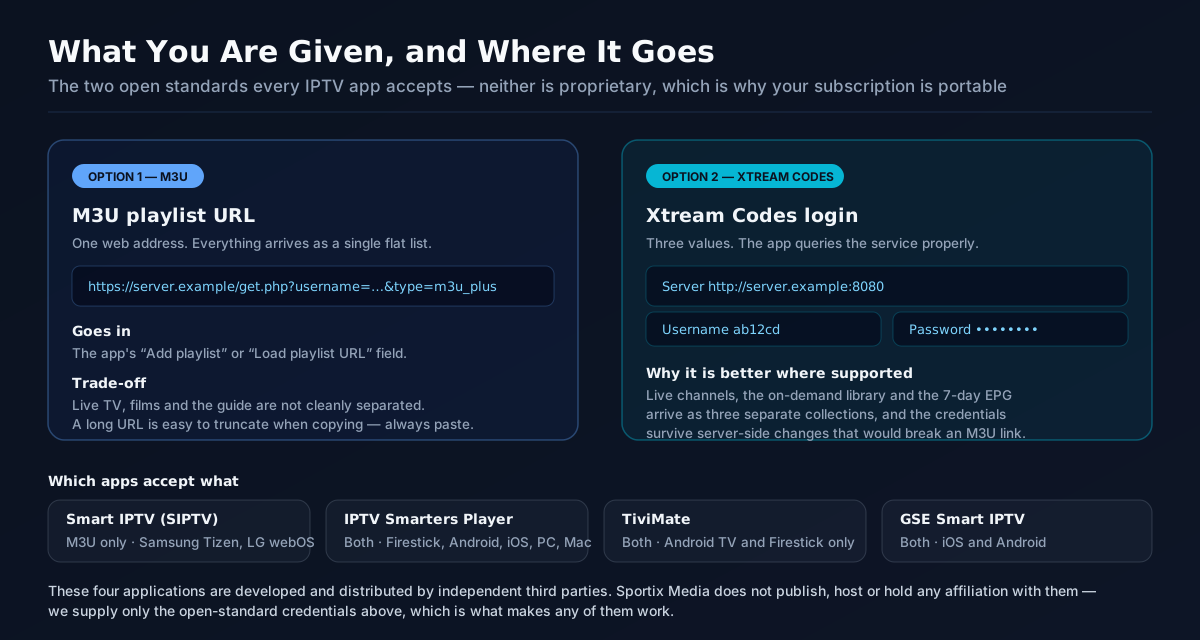
An M3U URL Is Just a Web Address
One link that resolves to your channel list. Paste it into the app and the line-up populates. It is a plain open standard, which is precisely why it works in every app rather than only in one company's box.
Xtream Codes Is a Login Instead
A server address, a username and a password. Generally the better option where the app supports it, because it pulls live channels, the on-demand library and the programme guide as three separate lists and survives updates more cleanly.
Smart IPTV (SIPTV) Suits Samsung and LG
Purpose-built for Tizen and webOS, so it runs on the television itself with no extra hardware. Its one quirk is that it is licensed per MAC address, which is worth knowing before you buy a subscription for it.
IPTV Smarters Player Is the All-Rounder
Covers the widest range — Firestick, Android, iOS, Windows, macOS, Samsung and LG. The right default when a household mixes Apple and Android devices, and it accepts both M3U and Xtream Codes.
TiviMate Is the Best on Android
The strongest programme guide of any IPTV player and the fastest channel switching, which matters most on a Firestick. Android-only, and recording sits behind its own paid tier — nothing to do with your subscription.
Which App for Which Device
| App | Runs on | Accepts | Best for |
|---|---|---|---|
| Smart IPTV (SIPTV) | Samsung Tizen, LG webOS | M3U playlist URL | A TV with no external box attached |
| IPTV Smarters Player | Firestick, Android, iOS, Windows, macOS, Samsung, LG | M3U and Xtream Codes | Mixed households; the safe default |
| TiviMate | Android TV, Firestick, Android | M3U and Xtream Codes | Best guide and fastest zapping |
| GSE Smart IPTV | iOS, Android | M3U and Xtream Codes | iPhone and iPad users |
| Built-in TV app | Varies by manufacturer | Usually M3U only | Convenience over features |
What You Are Given and Where It Goes
| What you receive | What it looks like | Where it goes in the app |
|---|---|---|
| M3U playlist URL | A single https:// web address | The "Add playlist" or "Load playlist URL" field |
| Xtream Codes server | A host address, e.g. http://server:port | The "Server URL" field on the login screen |
| Xtream Codes username | A short alphanumeric string | The "Username" field |
| Xtream Codes password | A short alphanumeric string | The "Password" field |
| EPG / XMLTV URL | A separate https:// address | Usually automatic; a manual field exists if not |
Why We Do Not Sell an App
Plenty of providers ship their own branded player and insist you use it. It is an effective retention tactic and a poor deal for you: the moment your subscription is only usable inside one company’s software, leaving costs you your setup as well as your subscription. We deliver Xtream Codes and M3U instead, which are open standards, and the practical consequence is that you can walk away from us without re-learning anything.
It also means you get to use the best app for your hardware rather than the only one on offer. TiviMate has a better programme guide than any provider-branded player we have seen. Smart IPTV runs natively on a Samsung or LG panel with nothing else plugged in. IPTV Smarters Player covers a mixed Apple-and-Android household from one login. None of those are ours and all of them work.
The corollary is that when an app misbehaves, the app is usually the problem. An empty channel list after a correct paste, a guide that will not populate, a Samsung licence tied to a MAC address — those sit with the app developer. The way to tell them apart is to enter the same credentials somewhere else: if the line-up loads on a second device, the subscription is fine and the first app is not.
One thing we will not do on this page. A large share of searching around these app names is people looking for free playlist files and shared logins to load into them. We do not publish those, do not link to them, and would not — they stop working within days, there is nobody accountable when they do, and entering payment details anywhere near them is a genuinely bad idea. The apps are legitimate software. What you point them at is the part that matters.
Frequently Asked Questions
All plans and prices are on one page
Every subscription length, connection count and price is listed together on our pricing page — from £10 for a single month up to £75, with the cheapest working out at £3.75/month on a 12-month plan. Nothing on this page overrides it.
Get Credentials That Work In Whichever App You Prefer
A 6-hour free trial with no card details, delivered as both an M3U URL and an Xtream Codes login. Load them into the app you already use and see whether the line-up holds up.